Install Missing
The Install Missing feature allows you to open any workflow in ComfyUI and have Nuvu automatically find and install all missing dependencies.
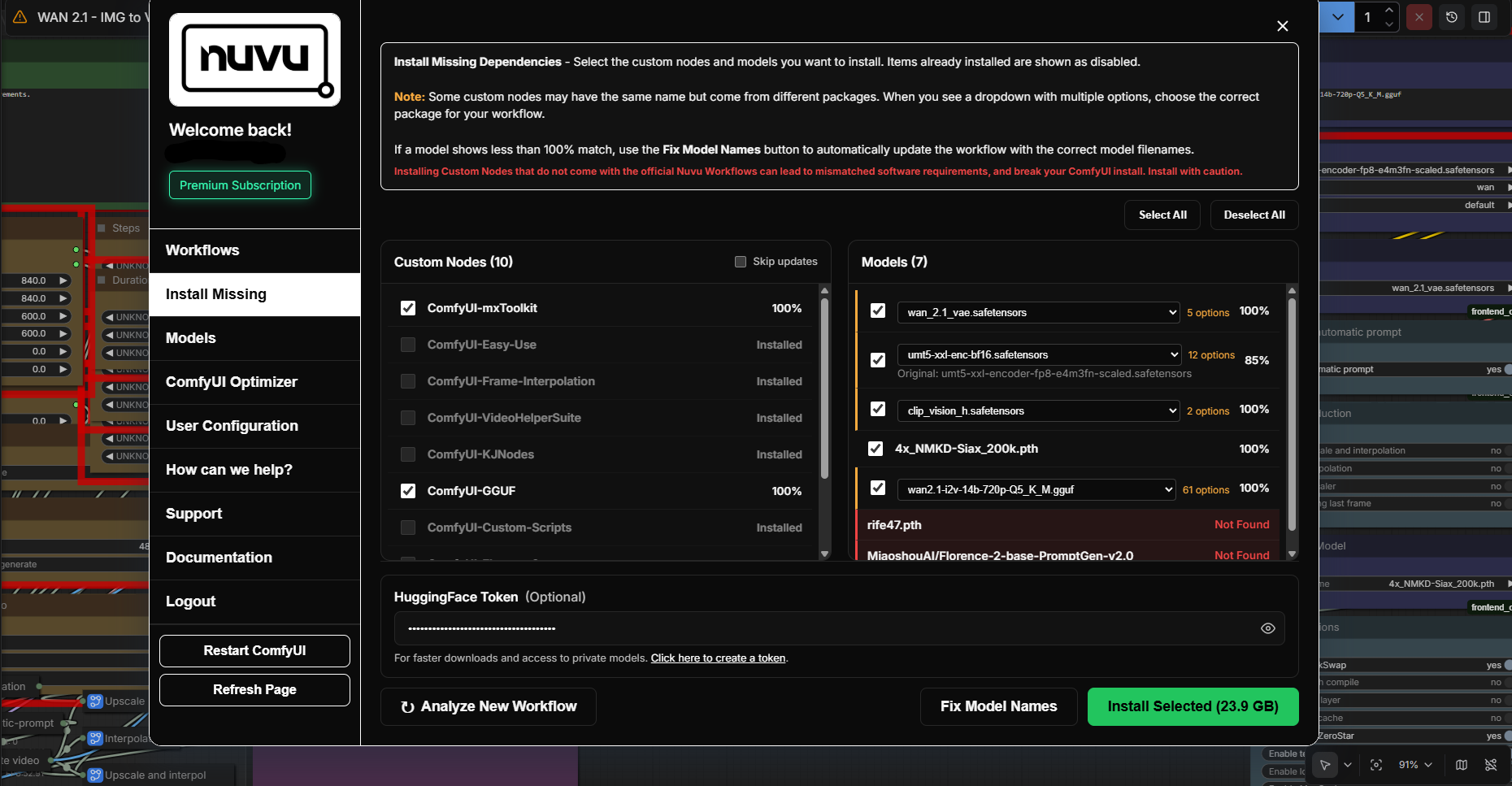
How It Works
- Open any workflow in ComfyUI (even one you downloaded from the internet)
- Open the Nuvu Dashboard
- Click Install Missing
- Nuvu scans the workflow for:
- Missing custom nodes
- Missing models
- All dependencies are downloaded and installed automatically
Benefits
- No more red nodes — Automatically resolve missing custom nodes
- No more searching for models — Nuvu finds the right checkpoint files
- Works with any workflow — Not just Nuvu workflows
Important Notes
warning
It is the user's responsibility to verify all files and custom nodes are compatible with their environment. Nuvu does not guarantee stability through the Install Missing feature for third-party workflows.
Install Missing works best with:
- Popular, well-documented workflows
- Workflows that use commonly available models
- Workflows from trusted sources
Requirements
The Install Missing feature requires a Nuvu Premium subscription.
Related
- Workflow Installer — Install curated Nuvu workflows instead
- Model Installer — Manually browse and install specific models
- User Configuration — Configure Hugging Face token for gated models
- Getting Support — Get help if Install Missing isn't working